> ## Documentation Index
> Fetch the complete documentation index at: https://docs.textyess.com/llms.txt
> Use this file to discover all available pages before exploring further.
# Conditions
> Branch your flow on customer attributes, order data, history, or replies — using presets for the common cases and custom expressions when you need more.
A **condition** is a boolean test that lives on a **Conditional Split** step. The flow follows the `true` branch when the condition is satisfied, the `false` branch otherwise.
TextYess gives you three ways to write a condition. Most of the time you'll use the first one — pick from a list and fill in a value.
Ready-made conditions for the most common cases ("has placed an order", "cart value over X"). Fill in a value, done.
Compare any value from memory (trigger data, message replies, previous step output) against another value. Built visually.
For power users — write a small expression in our sandboxed expression language. Full reference below.
## Presets
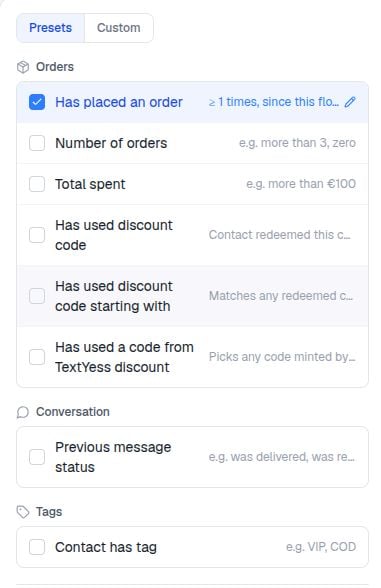
Presets are the fastest way to express "what kind of customer is this?". The editor groups them by category.
 ### Order presets
| Preset | What it tests |
| ------------------------------------------ | ------------------------------------------------------------------- |
| **Has placed an order** | Whether the contact has placed orders in the configured timeframe |
| **Number of orders** | A comparison on the contact's order count |
| **Total spent** | A comparison on the contact's lifetime / windowed spend |
| **Order payment status** | `paid`, `pending`, `refunded`, etc. (current trigger order only) |
| **Order fulfillment status** | `fulfilled`, `unfulfilled`, `partial` (current trigger order only) |
| **Order shipping country** | Equals / contains / not equals (current trigger order only) |
| **Order has discount code** | The current trigger order's discount codes contain a value |
| **Order has line item** | The current order has a line item matching a SKU / title |
| **Order payment method** | The current order used (or did not use) a specific method |
| **Order total** | A comparison on the current order's total |
| **Order has tag** | The current order carries a specific tag |
| **Has used discount code** | The contact has previously redeemed an exact code |
| **Has used discount code starting with** | The contact has redeemed any code starting with a prefix |
| **Has used a code from TextYess discount** | The contact has redeemed any code from a TextYess discount campaign |
### Checkout presets
| Preset | What it tests |
| ----------------------------------- | --------------------------------------------------------------------------------------- |
| **Has abandoned checkout** | An abandoned checkout exists in memory (always true for the abandoned-checkout trigger) |
| **Started checkout** | Whether the contact started checkouts in the configured timeframe |
| **Added product to cart** | Whether the contact added to cart in the configured timeframe |
| **Cart value** / **Checkout total** | Comparison on the checkout's total |
| **Checkout item count** | Comparison on the number of line items |
| **Checkout has product** | A line item matches a SKU / title |
| **Checkout has discount** | The checkout has any discount applied |
| **Checkout discount amount** | Comparison on the discount value |
### Product presets
| Preset | What it tests |
| ------------------------- | ---------------------------------------------------- |
| **Product in collection** | The triggering product belongs to a named collection |
| **Product price** | Comparison on the product's price |
| **Product title** | Equals / contains the value |
### Conversation presets
| Preset | What it tests |
| --------------------------- | -------------------------------------------------------------------- |
| **Clicked button** | The contact clicked a specific button on a previous Send Message |
| **Did not click button** | The opposite |
| **Previous message status** | The previous Send Message reached `delivered` / `read` / didn't fail |
### Tag presets
| Preset | What it tests |
| ------------------- | ---------------------------------------- |
| **Contact has tag** | The contact carries a specific tag |
| **Order has tag** | The trigger order carries a specific tag |
### Contact presets
| Preset | What it tests |
| ---------------- | ---------------------------------------------------------------------------- |
| **Phone number** | Starts with / contains / equals a value — useful for routing by country code |
### Timeframes
Most order, checkout, and history presets accept a **timeframe**:
| Mode | What it means |
| ------------------------- | ------------------------------------------------------------------------------------------------------------------ |
| `All time` | No date restriction |
| `Last N units` | Within the last N minutes / hours / days |
| `After a date` | On or after a fixed calendar date |
| `Before a date` | Up to and including a fixed date |
| `Between two dates` | Inside a fixed calendar window |
| `Since this flow started` | From the moment this execution began — useful to detect "did they place an order **while** this flow was running?" |
| `Between relative` | A floating window like "between 7 and 14 days ago" |
**Since this flow started** is the standard way to build "did the customer convert before we got to the discount message?" branches in abandoned-cart and browse-abandonment flows.
## Variable picker
When no preset fits, use the variable picker. Pick a value on the left, an operator in the middle, and a value on the right. Both sides can be variables, literals, or numeric calculations.
### Order presets
| Preset | What it tests |
| ------------------------------------------ | ------------------------------------------------------------------- |
| **Has placed an order** | Whether the contact has placed orders in the configured timeframe |
| **Number of orders** | A comparison on the contact's order count |
| **Total spent** | A comparison on the contact's lifetime / windowed spend |
| **Order payment status** | `paid`, `pending`, `refunded`, etc. (current trigger order only) |
| **Order fulfillment status** | `fulfilled`, `unfulfilled`, `partial` (current trigger order only) |
| **Order shipping country** | Equals / contains / not equals (current trigger order only) |
| **Order has discount code** | The current trigger order's discount codes contain a value |
| **Order has line item** | The current order has a line item matching a SKU / title |
| **Order payment method** | The current order used (or did not use) a specific method |
| **Order total** | A comparison on the current order's total |
| **Order has tag** | The current order carries a specific tag |
| **Has used discount code** | The contact has previously redeemed an exact code |
| **Has used discount code starting with** | The contact has redeemed any code starting with a prefix |
| **Has used a code from TextYess discount** | The contact has redeemed any code from a TextYess discount campaign |
### Checkout presets
| Preset | What it tests |
| ----------------------------------- | --------------------------------------------------------------------------------------- |
| **Has abandoned checkout** | An abandoned checkout exists in memory (always true for the abandoned-checkout trigger) |
| **Started checkout** | Whether the contact started checkouts in the configured timeframe |
| **Added product to cart** | Whether the contact added to cart in the configured timeframe |
| **Cart value** / **Checkout total** | Comparison on the checkout's total |
| **Checkout item count** | Comparison on the number of line items |
| **Checkout has product** | A line item matches a SKU / title |
| **Checkout has discount** | The checkout has any discount applied |
| **Checkout discount amount** | Comparison on the discount value |
### Product presets
| Preset | What it tests |
| ------------------------- | ---------------------------------------------------- |
| **Product in collection** | The triggering product belongs to a named collection |
| **Product price** | Comparison on the product's price |
| **Product title** | Equals / contains the value |
### Conversation presets
| Preset | What it tests |
| --------------------------- | -------------------------------------------------------------------- |
| **Clicked button** | The contact clicked a specific button on a previous Send Message |
| **Did not click button** | The opposite |
| **Previous message status** | The previous Send Message reached `delivered` / `read` / didn't fail |
### Tag presets
| Preset | What it tests |
| ------------------- | ---------------------------------------- |
| **Contact has tag** | The contact carries a specific tag |
| **Order has tag** | The trigger order carries a specific tag |
### Contact presets
| Preset | What it tests |
| ---------------- | ---------------------------------------------------------------------------- |
| **Phone number** | Starts with / contains / equals a value — useful for routing by country code |
### Timeframes
Most order, checkout, and history presets accept a **timeframe**:
| Mode | What it means |
| ------------------------- | ------------------------------------------------------------------------------------------------------------------ |
| `All time` | No date restriction |
| `Last N units` | Within the last N minutes / hours / days |
| `After a date` | On or after a fixed calendar date |
| `Before a date` | Up to and including a fixed date |
| `Between two dates` | Inside a fixed calendar window |
| `Since this flow started` | From the moment this execution began — useful to detect "did they place an order **while** this flow was running?" |
| `Between relative` | A floating window like "between 7 and 14 days ago" |
**Since this flow started** is the standard way to build "did the customer convert before we got to the discount message?" branches in abandoned-cart and browse-abandonment flows.
## Variable picker
When no preset fits, use the variable picker. Pick a value on the left, an operator in the middle, and a value on the right. Both sides can be variables, literals, or numeric calculations.
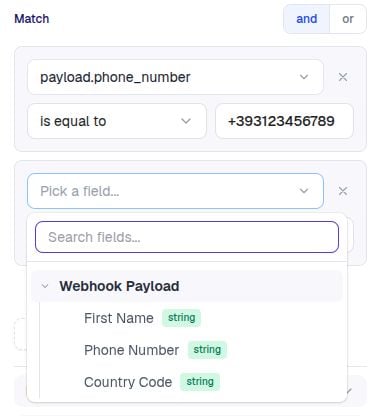 Example: send a follow-up only when the order total is at least €100 and the customer is in Italy.
```
order.total >= 100
order.shippingAddress.country == "IT"
```
Variables you'll commonly use:
| Variable | Source |
| ------------------ | --------------------------------------------------------------------------- |
| `order.*` | New Order, Fulfilled Order |
| `checkout.*` | Abandoned Checkout |
| `product.*` | Product Viewed, Product Added to Cart, Purchase Intent |
| `contact.*` | All triggers |
| `message.text` | New Message, Stop Message |
| `payload.*` | Webhook trigger |
| `.` | Output of any previous step (Send Message reply, Send Webhook status, etc.) |
| `summary.` | Pre-rendered display strings for cart / order / product |
The picker shows what's available for the trigger and previous steps in your flow — you don't memorise paths.
## Custom expressions
For everything else, write a custom expression. They're short, predictable, and intentionally not full JavaScript.
Example: send a follow-up only when the order total is at least €100 and the customer is in Italy.
```
order.total >= 100
order.shippingAddress.country == "IT"
```
Variables you'll commonly use:
| Variable | Source |
| ------------------ | --------------------------------------------------------------------------- |
| `order.*` | New Order, Fulfilled Order |
| `checkout.*` | Abandoned Checkout |
| `product.*` | Product Viewed, Product Added to Cart, Purchase Intent |
| `contact.*` | All triggers |
| `message.text` | New Message, Stop Message |
| `payload.*` | Webhook trigger |
| `.` | Output of any previous step (Send Message reply, Send Webhook status, etc.) |
| `summary.` | Pre-rendered display strings for cart / order / product |
The picker shows what's available for the trigger and previous steps in your flow — you don't memorise paths.
## Custom expressions
For everything else, write a custom expression. They're short, predictable, and intentionally not full JavaScript.
 ### Syntax basics
```
order.total > 50 and contact.phone startsWith "+39"
```
| Operator | Meaning |
| -------------------- | ------------------- |
| `==`, `!=` | Equality |
| `>`, `>=`, `<`, `<=` | Numeric comparisons |
| `and`, `or`, `not` | Logical operators |
| `+`, `-`, `*`, `/` | Numeric arithmetic |
Use `==`, not `===`. Use `and`, not `&&`. The expression engine is **not** JavaScript — these will not work. The list of available operators above is exhaustive.
### Functions you can call
| Function | What it does | Example |
| --------------------- | ------------------------ | -------------------------------------------- |
| `concat(a, b, …)` | String concatenation | `concat("Order ", order.number)` |
| `lower(s)` | Lowercase | `lower(order.currency)` |
| `upper(s)` | Uppercase | `upper(order.currency)` |
| `length(s)` | String or array length | `length(order.lineItems) > 0` |
| `contains(s, sub)` | Substring / membership | `contains(order.discountCodes, "WELCOME10")` |
| `startsWith(s, p)` | Starts with | `startsWith(contact.phone, "+39")` |
| `notStartsWith(s, p)` | Does not start with | `notStartsWith(order.currency, "USD")` |
| `endsWith(s, suf)` | Ends with | `endsWith(order.currency, "R")` |
| `notEndsWith(s, suf)` | Does not end with | `notEndsWith(order.currency, "USD")` |
| `isEmpty(s)` | Null / undefined / empty | `isEmpty(order.notes)` |
| `isNotEmpty(s)` | The opposite | `isNotEmpty(contact.email)` |
### Worked examples
```
order.total > 200
```
```
contains("IT,DE,FR,ES,NL,BE", order.shippingAddress.country)
```
```
contains(contact.tags, "vip") and welcome_step.reply.buttonId == "yes"
```
```
welcome_step.reply.type == "button" and welcome_step.reply.buttonId == "yes"
```
```
isNotEmpty(contact.email) and isEmpty(contact.phone)
```
### When custom expressions are the only option
* Combining two conditions with `or` (presets compose only with `and`).
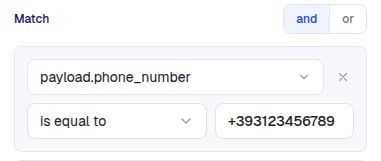
* Checking a webhook payload field — `payload.cart_value > 50` after a webhook trigger.
* Doing math — `checkout.total_price - checkout.total_discount > 100`.
* Validating button replies — `step_id.reply.text == "Yes"`.
Next: [Messages & Templates](/flows/messages) — the WhatsApp template model that powers Send Message.
### Syntax basics
```
order.total > 50 and contact.phone startsWith "+39"
```
| Operator | Meaning |
| -------------------- | ------------------- |
| `==`, `!=` | Equality |
| `>`, `>=`, `<`, `<=` | Numeric comparisons |
| `and`, `or`, `not` | Logical operators |
| `+`, `-`, `*`, `/` | Numeric arithmetic |
Use `==`, not `===`. Use `and`, not `&&`. The expression engine is **not** JavaScript — these will not work. The list of available operators above is exhaustive.
### Functions you can call
| Function | What it does | Example |
| --------------------- | ------------------------ | -------------------------------------------- |
| `concat(a, b, …)` | String concatenation | `concat("Order ", order.number)` |
| `lower(s)` | Lowercase | `lower(order.currency)` |
| `upper(s)` | Uppercase | `upper(order.currency)` |
| `length(s)` | String or array length | `length(order.lineItems) > 0` |
| `contains(s, sub)` | Substring / membership | `contains(order.discountCodes, "WELCOME10")` |
| `startsWith(s, p)` | Starts with | `startsWith(contact.phone, "+39")` |
| `notStartsWith(s, p)` | Does not start with | `notStartsWith(order.currency, "USD")` |
| `endsWith(s, suf)` | Ends with | `endsWith(order.currency, "R")` |
| `notEndsWith(s, suf)` | Does not end with | `notEndsWith(order.currency, "USD")` |
| `isEmpty(s)` | Null / undefined / empty | `isEmpty(order.notes)` |
| `isNotEmpty(s)` | The opposite | `isNotEmpty(contact.email)` |
### Worked examples
```
order.total > 200
```
```
contains("IT,DE,FR,ES,NL,BE", order.shippingAddress.country)
```
```
contains(contact.tags, "vip") and welcome_step.reply.buttonId == "yes"
```
```
welcome_step.reply.type == "button" and welcome_step.reply.buttonId == "yes"
```
```
isNotEmpty(contact.email) and isEmpty(contact.phone)
```
### When custom expressions are the only option
* Combining two conditions with `or` (presets compose only with `and`).
* Checking a webhook payload field — `payload.cart_value > 50` after a webhook trigger.
* Doing math — `checkout.total_price - checkout.total_discount > 100`.
* Validating button replies — `step_id.reply.text == "Yes"`.
Next: [Messages & Templates](/flows/messages) — the WhatsApp template model that powers Send Message.