

true branch when the condition is satisfied, the false branch otherwise.
TextYess gives you three ways to write a condition. Most of the time you’ll use the first one — pick from a list and fill in a value.
Presets
Ready-made conditions for the most common cases (“has placed an order”, “cart value over X”). Fill in a value, done.
Variable picker
Compare any value from memory (trigger data, message replies, previous step output) against another value. Built visually.
Custom expression
For power users — write a small expression in our sandboxed expression language. Full reference below.
Presets
Presets are the fastest way to express “what kind of customer is this?”. The editor groups them by category.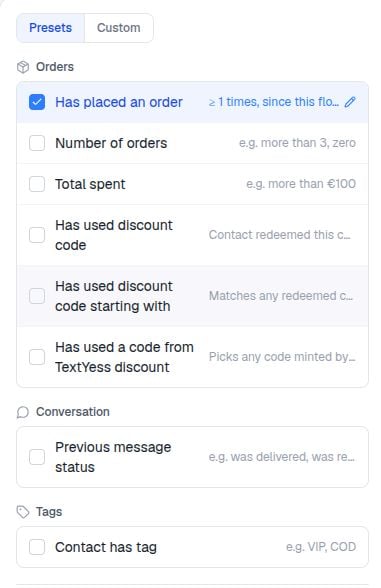
Order presets
Checkout presets
Product presets
Conversation presets
Tag presets
Contact presets
Timeframes
Most order, checkout, and history presets accept a timeframe:Variable picker
When no preset fits, use the variable picker. Pick a value on the left, an operator in the middle, and a value on the right. Both sides can be variables, literals, or numeric calculations.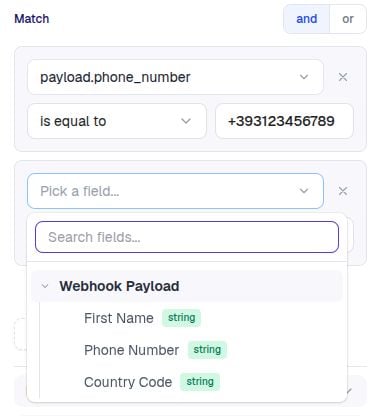
The picker shows what’s available for the trigger and previous steps in your flow — you don’t memorise paths.
Custom expressions
For everything else, write a custom expression. They’re short, predictable, and intentionally not full JavaScript.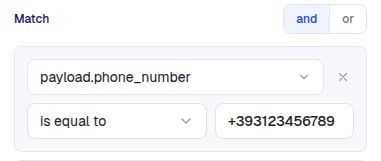
Syntax basics
Functions you can call
Worked examples
- High-value order
- EU customer only
- VIP repeat customer with positive reply
- Replied YES to opt-in
- Has email but no phone
When custom expressions are the only option
- Combining two conditions with
or(presets compose only withand). - Checking a webhook payload field —
payload.cart_value > 50after a webhook trigger. - Doing math —
checkout.total_price - checkout.total_discount > 100. - Validating button replies —
step_id.reply.text == "Yes".